iPhone app · Product design & engineering

Flare
A native iPhone app for arranging spontaneous plans with friends. Create a meetup, choose who can see it, and coordinate through map discovery, RSVPs, and comments.
- Role
- Founder and developer
- Dates
- 2025 – Present
- Platform
- Native iOS
Published on the App Store. Version 1.2 is in development.
- Users
- 100+
- Countries
- 3
- Flares launched
- 340+
Usage reported by the project owner as of .
Project overview
The product, the problem, and my role
The problem
A spontaneous idea can disappear in a group chat while people work out the details. I wanted a way to share a concrete plan with an activity, meeting point, start time, and a clear way to join.
Different plans need different audiences. Flare supports public discovery, all-friend sharing, and selected groups, with a map and list for finding relevant plans.
From idea to delivery
I designed and built Flare from the initial product idea through the native app, Firebase backend, and App Store release. The project covers interaction design, location-based discovery, social features, media, notifications, and ongoing product development.
- Product concept, interaction design, and native SwiftUI implementation
- Map discovery, location selection, and flare creation
- Friends, groups, RSVPs, comments, and image sharing
- Firebase data, authentication, rules, and TypeScript functions
- Onboarding, notification routing, and account-lifecycle work
- App Store delivery, regression workflows, and the companion website
Product design
Interface & design
A structured plan
Activity, time, meeting point, and audience give people the details they need to decide whether to join.
Two ways to browse
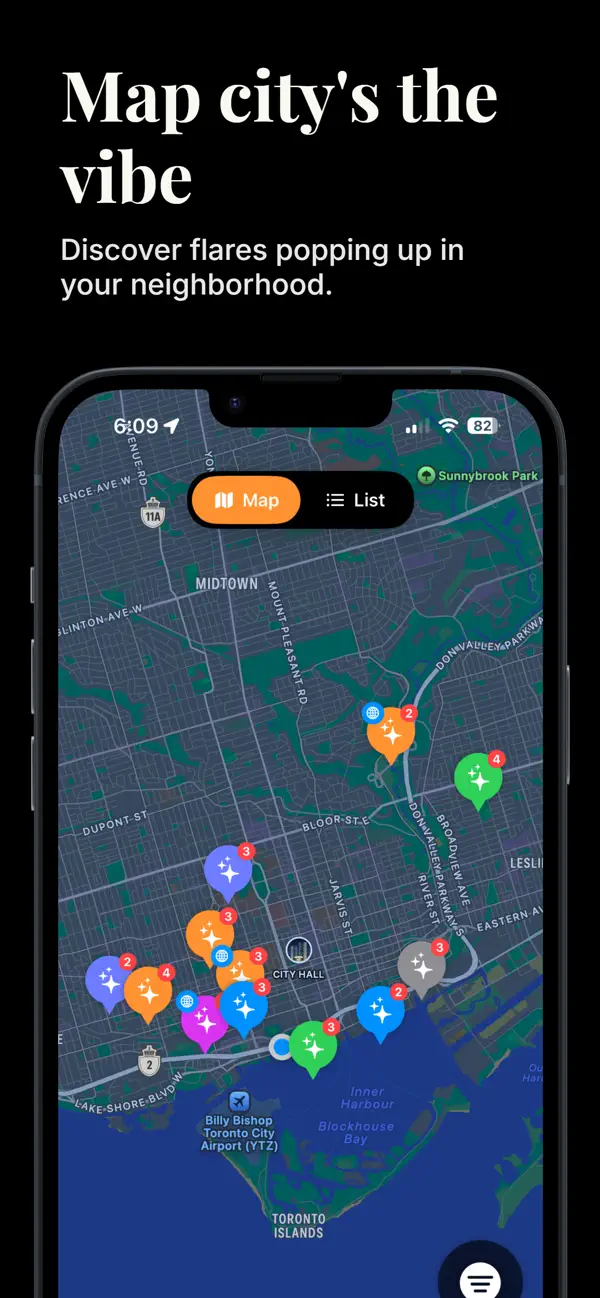
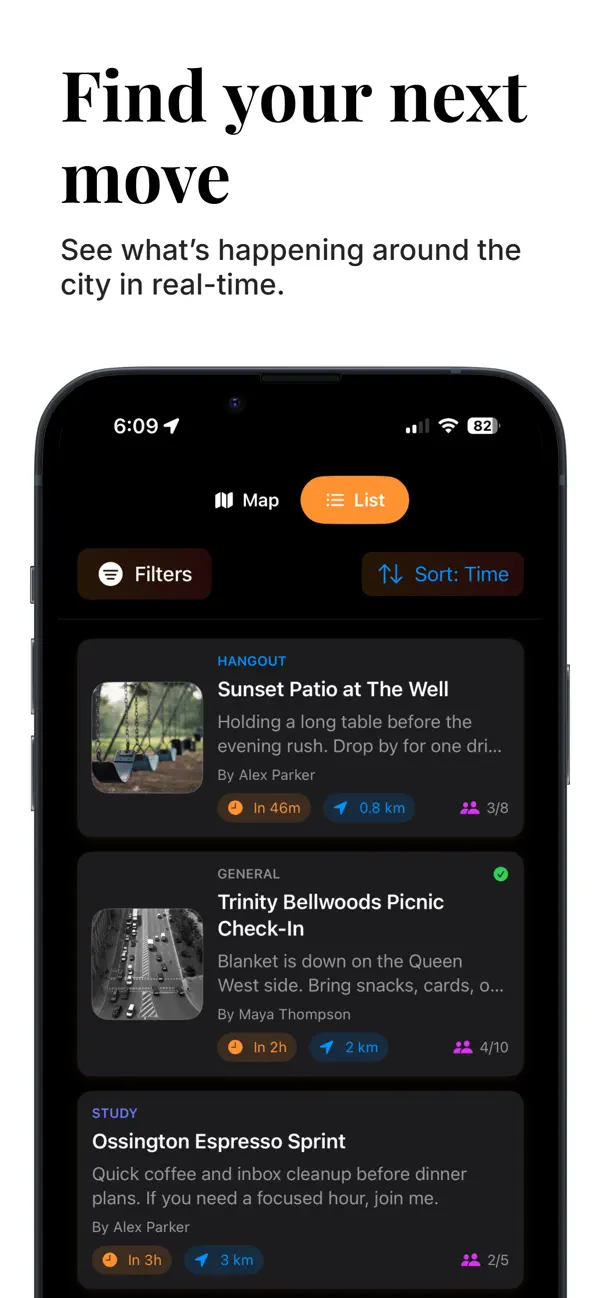
The map provides geographic context. The list makes timing, distance, and participation easier to compare.
Reusable audiences
Friends and groups make repeated planning easier, while each flare keeps its own audience choice.
Map discovery
Activity markers, nearby plans, and a map/list switch.
Nearby plans
A list view for comparing the time, distance, and participation.
Creating a flare
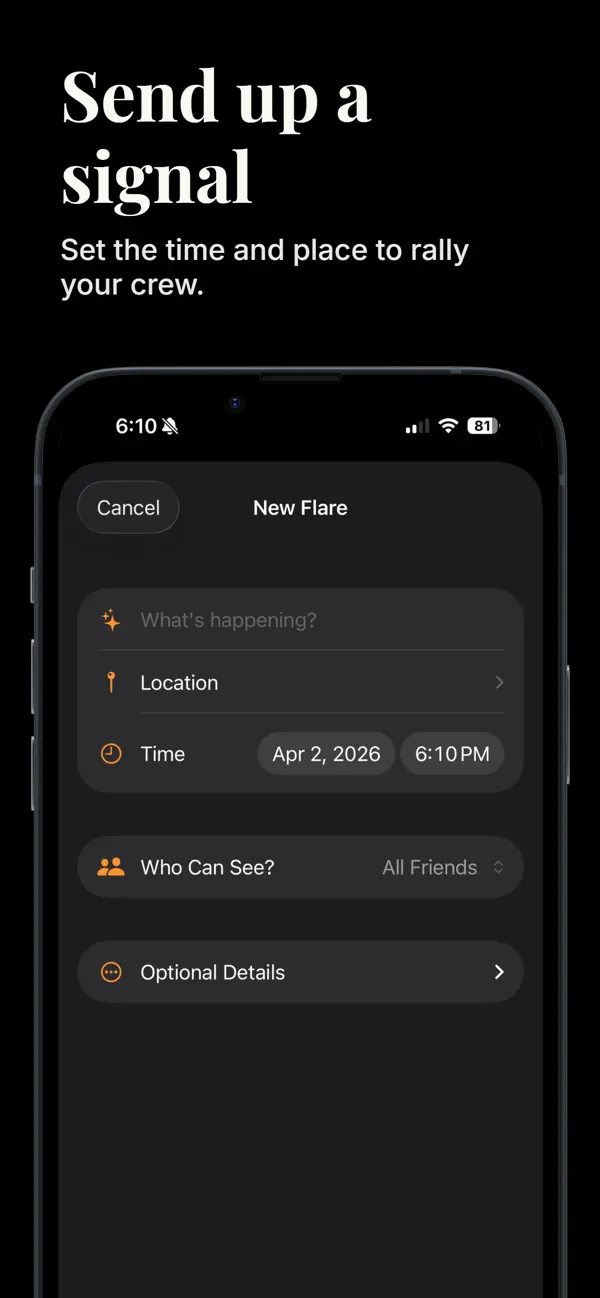
The activity, meeting point, time, and audience in one flow.
Host view & RSVPs
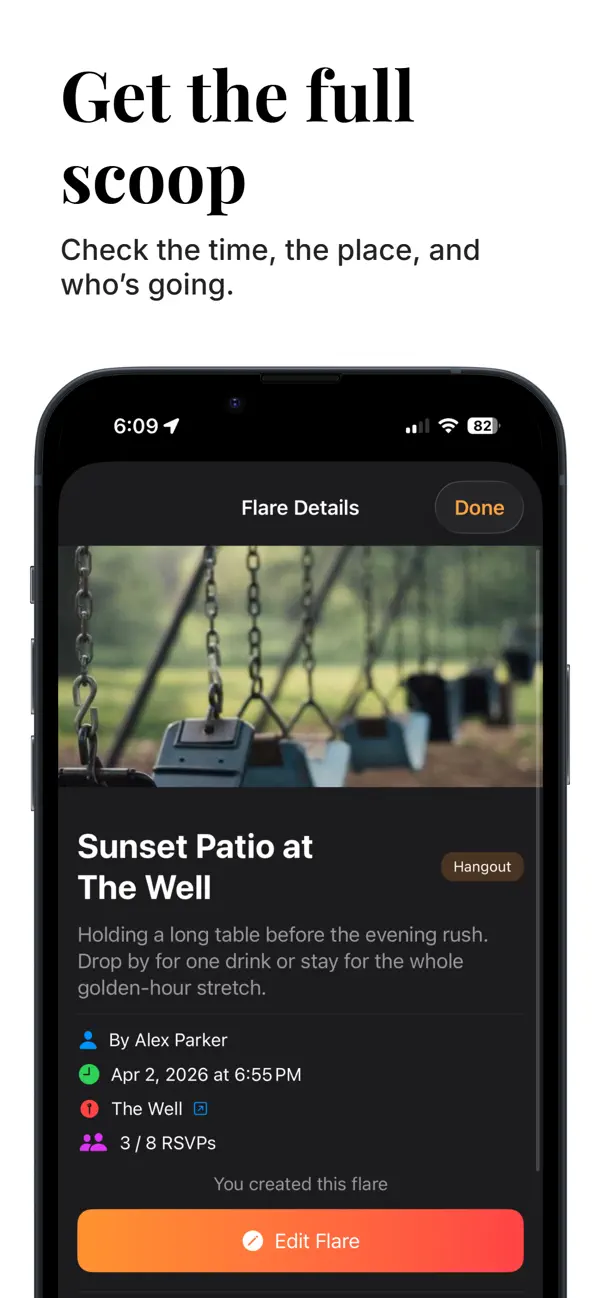
The creator’s detail view, including the current RSVP count.
Published App Store previews from version 1.1, with example plans. Select a preview to view the complete image.
Engineering
Architecture and implementation
A native SwiftUI client, a Firebase backend, and TypeScript functions for the work that continues beyond the screen.
01Client
SwiftUI client
Views and view models handle creation, map/list discovery, social screens, and local caches. MapKit and CoreLocation support browsing and meeting-point selection.
02Auth
Identity and permissions
Firebase Authentication supports Apple, Google, and email sign-in. Audience data and Firestore rules govern access to flares and social relationships.
03Data
Firestore and Storage
Firestore stores flares, relationships, RSVPs, and comment threads. Cloud Storage holds uploaded images; client caches support frequently revisited content.
04Backend
Functions and messaging
TypeScript Cloud Functions handle reminders, social operations, archiving, and account workflows. Firebase Cloud Messaging connects backend events to the iPhone app.
SwiftUI · MapKit · Firebase · TypeScript · Cloud Functions · CoreLocation · Firestore · Cloud Storage · Cloud Messaging · PhoneNumberKit · Node.js · XCTest · Maestro
Design decisions
- Native interaction, managed backend
- SwiftUI and MapKit provide the native interface. Firebase keeps authentication, live data, media, and messaging manageable for a solo product, with query design and access rules treated as part of feature work.
- Audience is part of the plan
- Public, friend, and group sharing are represented in the data model. The creation flow makes that choice visible before sending, and the backend applies the corresponding access checks.
- Keep discovery and history separate
- Flares leave active discovery two hours after their start time. Archiving keeps the map current while preserving activity history; it is separate from account or content deletion.
- Preserve intent through interrupted flows
- Recent work keeps first-plan selections and notification destinations available across setup and session restoration. Resumable backend jobs apply the same principle to longer account-cleanup operations.
Location and audience
Discovery uses the device’s location or a chosen search area. The meeting point belongs to the flare and is visible to its audience. Audience visibility and media authorization require separate treatment.
Moderation and lifecycle
Reporting, blocking, upload controls, and account deletion are part of the product’s operational design. Changes to the shared backend must preserve supported released clients.
Ongoing development
Recent engineering work
The current branches contain the following work for version 1.2 and its release process. These changes are separate from the published 1.1 previews above.
Onboarding and first-plan intent
Built native onboarding around example activities, carrying the selected activity through account setup into a draft. Location access is requested in context, and the user still chooses the real place, time, and audience before publishing.
Notifications and session recovery
Reworked token registration, notification preferences, and tap routing. A requested destination waits through session restoration and account setup, then opens the relevant flare or friend-request screen.
Contacts and account lifecycle
Improved optional contact discovery and phone verification. Built checkpointed account-deletion work with retries, ownership checks, and recovery after interruption. Production activation remains staged.
Device workflows and compatibility
Added a two-simulator QA workflow with disposable accounts and backend assertions. Release planning also covers compatibility with the published client, shared Firebase data, and physical-device checks.
Project outcomes
Results and lessons
Delivered
- Launched a native iPhone product on the App Store
- 340+ flares launched, reported as of October 8, 2026
- Delivered map/list discovery, audience choices, RSVPs, comments, and social groups
- Built and maintained the app, backend, release process, and companion website
What I learned
- The core interaction needs to explain the plan and its audience before asking someone to join
- Notifications depend on session state, permissions, preferences, and backend delivery working together
- A shared backend makes backward compatibility part of every release decision